> ## Documentation Index
> Fetch the complete documentation index at: https://v2galileo-feat-update-docs-main-30571363885.mintlify.site/llms.txt
> Use this file to discover all available pages before exploring further.
# Metrics overview
> Browse and register custom metrics across your project.
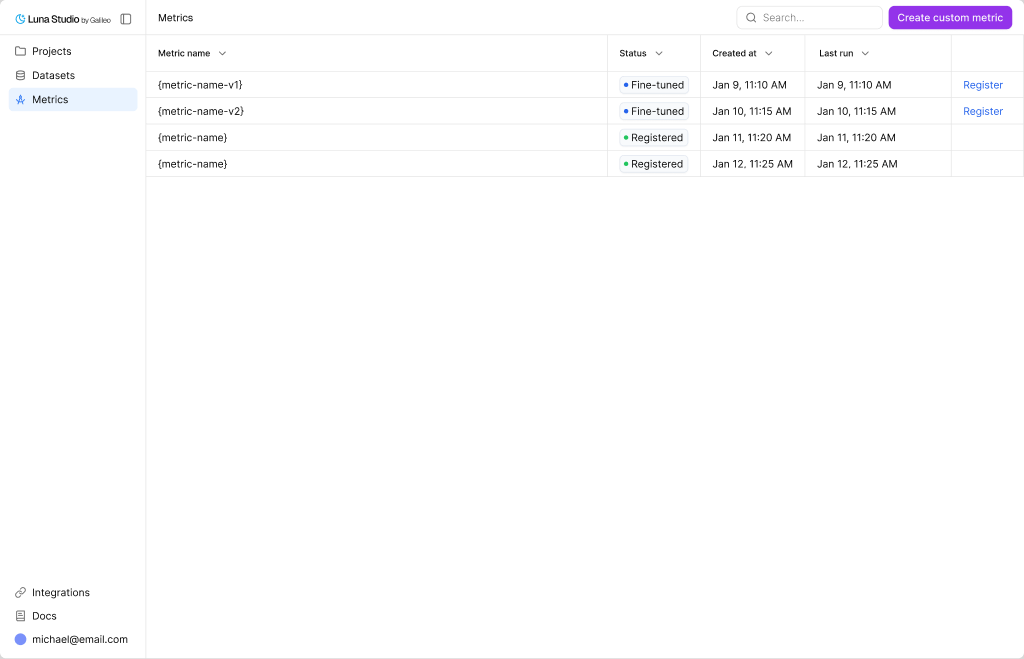
The **Metrics** page (sidebar → **Metrics**) is where you see all the finetuned / registered metrics from all projects. This serves as a single pane to view the true power of Luna Studio and how it has helped you.
 ## Register a metric
Once a metric reaches **Fine-tuned**, the **Register metric** action appears in the row's Actions cell. Clicking it opens the same modal documented in [Register a metric](/luna-studio/ui/runs/register-metric). This page does not run registration preflight before opening the modal; backend checks can still reject the submission, for example when the Galileo connection or metric contract is unsupported.
## Where to go next
Pick a template or write a custom prompt in the run creation flow.
Understand the statuses behind each metric's source run.
Publish an eligible Fine-tuned metric to the Galileo metrics store.
Launch a training run that produces a metric.
## Register a metric
Once a metric reaches **Fine-tuned**, the **Register metric** action appears in the row's Actions cell. Clicking it opens the same modal documented in [Register a metric](/luna-studio/ui/runs/register-metric). This page does not run registration preflight before opening the modal; backend checks can still reject the submission, for example when the Galileo connection or metric contract is unsupported.
## Where to go next
Pick a template or write a custom prompt in the run creation flow.
Understand the statuses behind each metric's source run.
Publish an eligible Fine-tuned metric to the Galileo metrics store.
Launch a training run that produces a metric.